Location
Dates
Guests
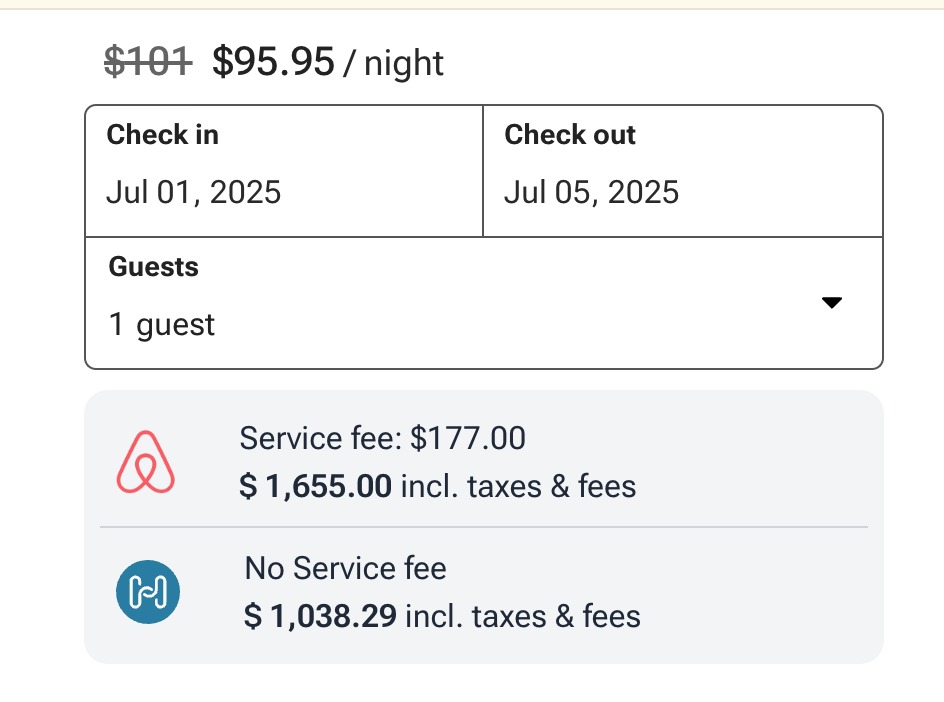
How can I display a price comparison in my quote widget?
Follow these steps to enable and display a price comparison in your widgets:
Last updated August 24, 2026
Go to https://www.houfy.com/widgets-old. (If you land on the AI Widget Builder at /widgets, open Classic widget builder in the left sidebar.)
Click the Quote tool widget.
Under Display Options, tick Show price comparison.
Click Get Code, then Copy Code.
Paste the code into your website where you want the widget to appear.
Good to know
The comparison shows an Airbnb price only, and only for listings that have an approved Airbnb link on them. VRBO prices are not shown in the widget.
The comparison panel appears only when your Houfy total is the lower one - a guest is never shown a price that beats yours.
Getting the embed code requires a Premium plan.
Did this answer your question?
Related Articles
- How to add Houfy widgets to your own website
- How to share the widget code with someone?
- We embedded some of the Houfy widgets to our own Wordpress website and received a direct booking including payment!
- How to add Houfy widgets to my WordPress website?
- How to add Houfy widgets to my Squarespace website?
Features
Settings
These links open an AI assistant with a summary prompt written by Houfy.