

Quick answer: Google Vacation Rentals shows vacation homes inside Google Search, Google Maps and Google Travel, with photos, prices and availability. Google doesn’t take bookings or charge hosts to appear. Most hosts get there through a connected partner, such as a marketplace or property management system, and guests click through to that partner’s page to book.
Key Takeaways
Google Vacation Rentals is a search feature, not a booking site. It sends guests to the partner page where they book.
Most hosts appear through a connected partner. On Houfy, listings that meet Google’s rules, including online payment through Stripe, Square or PayPal, are sent to Google without extra setup.
Google shows homes it can trust: complete details, real photos, an exact address, and a calendar and price that match the booking page.
A stale calendar or a price that changes at checkout loses the guest Google sent you.
Measure inquiries and booked nights from Google, not only views.
Google Vacation Rentals Shows Homes, Partners Take the Bookings
When someone searches “cabins in Gatlinburg” or opens Google Maps in a town, Google can show a panel of vacation homes with photos, nightly price, rating and dates. Clicking a home opens its details and the sites where it can be booked. The booking happens on that site, not on Google.
Google gets this information from partners that send it a feed of listings, prices and availability. Connecting directly takes a signed contract with Google, a technical contact and a listing feed, so most hosts use a partner instead. Google’s vacation rental onboarding guide describes the setup.
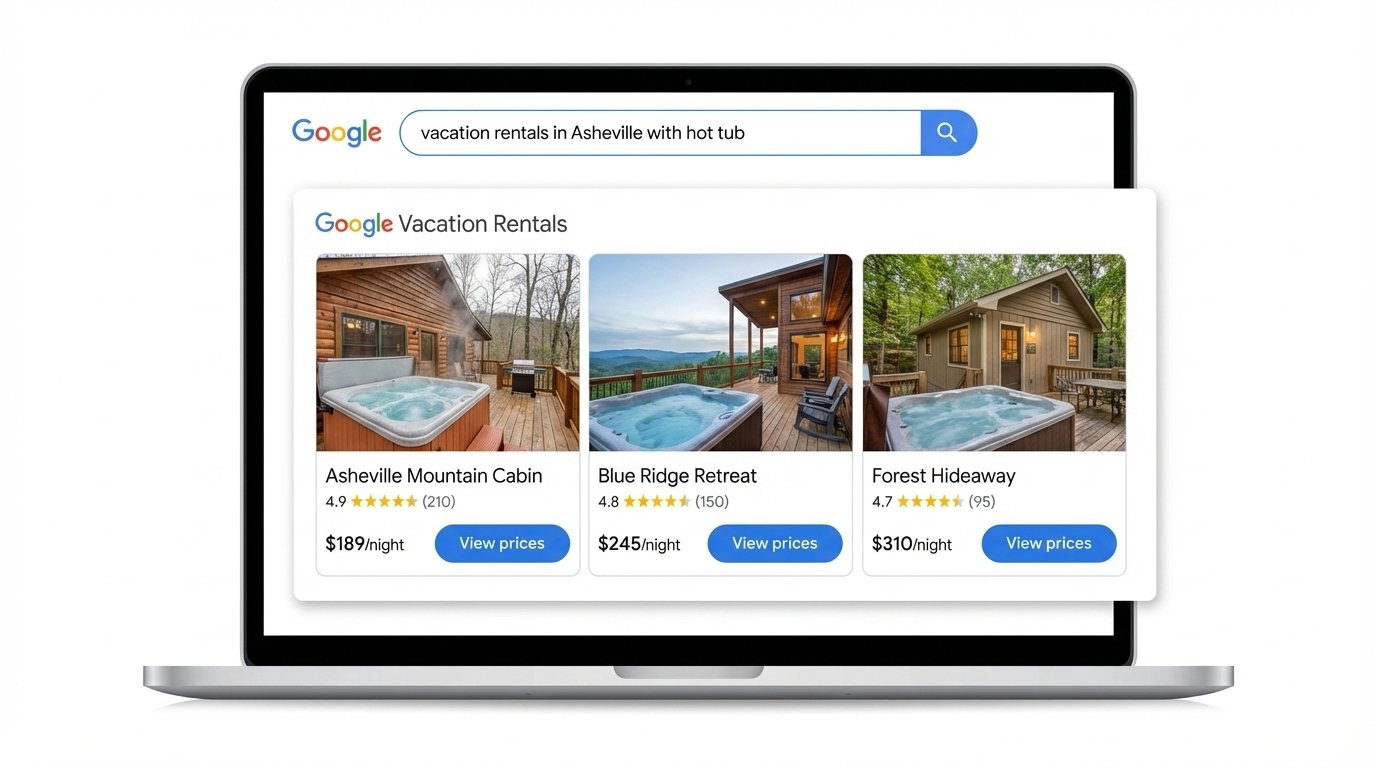
Houfy Sends Your Listing to Google for You
Houfy includes a listing in its feed to Google Vacation Rentals once it meets Google’s rules. Google requires, among other things, that guests can book and pay online, so you need a payment provider connected. Beyond that there is nothing to configure.
List your home on Houfy, or import it from Airbnb, Vrbo or your property management system. Add a listing.
Listings appear in Houfy search after it.
Connect Stripe, Square or PayPal so guests can book and pay online. Google only shows homes that can be booked.
Keep your calendar and price current. Google shows the price and dates from your Houfy calendar.
Guests who click book on your Houfy page.
Google decides which homes to show and when. Being in the feed makes a listing eligible; it doesn’t guarantee a place in the results.
What Google Needs to Show Your Home
Google shows homes it can describe accurately. Run this list once, then monthly:
Photos: 15 or more, the first one the outside or the main living area, all of the actual home
Address: exact, including the unit number, so Maps can place the pin
Sleeping arrangements: every bed listed, sofa beds included
Amenities: only what’s really there, such as parking, washer, workspace or a hot tub
Price: cleaning fees and taxes shown the same way they appear at checkout
Calendar: synced daily with every other site you list on
Payments: Stripe, Square or PayPal connected
Turn the Google Click Into a Booking
A guest who comes from Google has usually chosen the town and is comparing a few homes. Make the decision easy:
Reply the same day, ideally within the hour.
Answer the questions they’ll ask anyway in the listing: parking, check-in, pets, the nearest grocery store.
Send the total price and house rules in one message.
After the stay, ask for a review on Houfy. Google shows ratings in the panel.
If you also run your own site, a vacation rental website builder gives returning guests a place to book you again.
Measure Bookings, Not Views
Views alone tell you little. Each month, check:
How many inquiries and bookings came from Google
Booked nights and the average nightly rate from those bookings
Your reply time on those messages
Calendar errors: double bookings or dates blocked by mistake
If views are high and bookings low, fix the photos, price and reply time before spending on ads.
Frequently Asked Questions
Is Google Vacation Rentals free for hosts?
Google doesn’t charge hosts to appear. What you pay depends on the partner that sends your listing, and you need a payment provider so guests can book online.
Can I list my vacation rental on Google directly?
Only with a technical integration: Google asks for a signed contract, a technical contact and a listing feed. Most hosts use a partner that is already connected, such as a marketplace or property management system.
Why is my home not showing on Google?
Usually no payment provider connected, missing photos, an address Google can’t place, a blocked or outdated calendar, or a price that doesn’t match the booking page. Google also decides when to show a listing, so being eligible doesn’t guarantee a spot.
Do I need Google Ads?
No. Vacation rental results can show listings without an ad campaign. Ads are worth testing only once your listing turns visits into bookings.
Does Google Vacation Rentals replace Airbnb?
No. It’s a place guests find you. Many hosts keep their Airbnb or Vrbo listings and sync calendars with Houfy so Google can send guests to a page where they book directly.
Ready to appear on Google? List your home on Houfy. For more on taking bookings directly, read what vacation rental direct booking is and how to set up a Google Business Profile for your rental.
Source Citations
Google, vacation rentals onboarding — developers.google.com/hotels/vacation-rentals/dev-guide/onboarding
Google Search Central — developers.google.com/search
Houfy has 100,000+ live listings in over 100 countries.
Last Updated: October 27, 2026