Location
Dates
Guests
How to change the default listing of my website?
To change the default listing of my website, please follow below steps.
Última atualização 24 de agosto de 2026
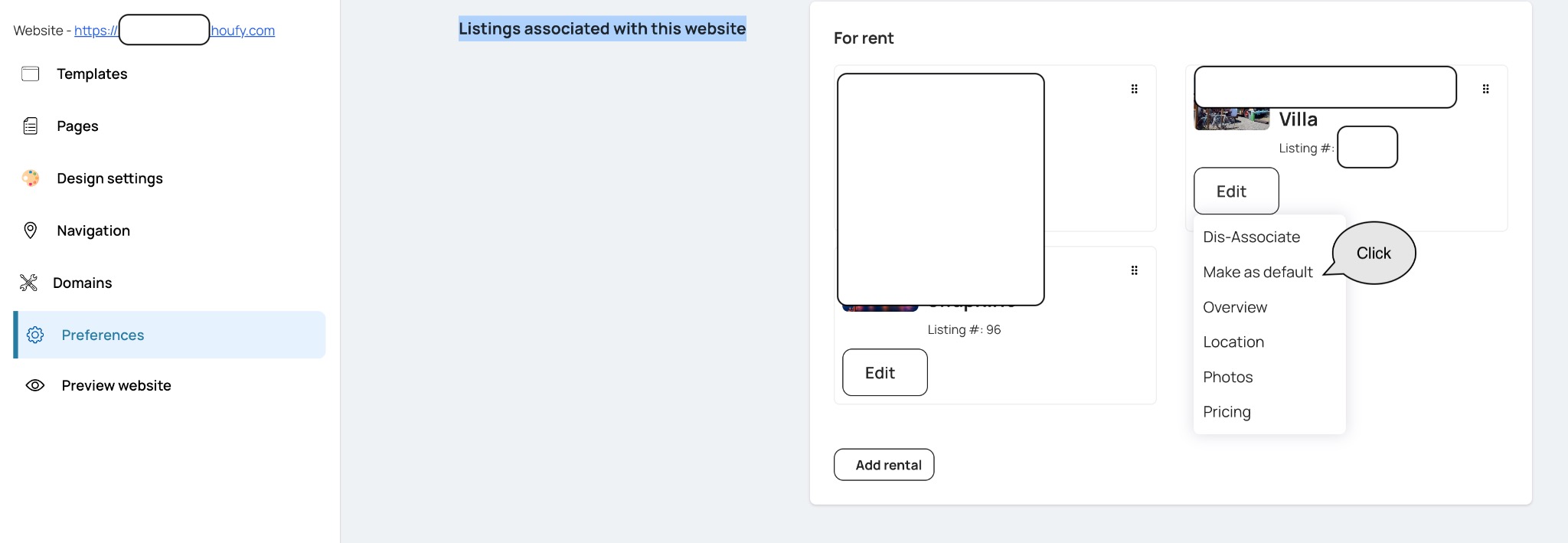
Open the website builder at houfy.com/new/website-classic and click Manage on the website you want to change.
Select Preferences from the left menu.
Expand the Listings section - its summary line reads Listings associated with this website. The sections on this page are collapsed until you click them.
Find the listing you want as the default and click Make as default.
Make as default and Edit are two separate buttons on the same row - Edit opens the listing editor, which is not where the default is set.
The listing that is currently the default is marked Default listing and has no Make as default button - that is expected.
Isto respondeu à sua pergunta?
Artigos Relacionados
Resources
Features
Settings
These links open an AI assistant with a summary prompt written by Houfy.
© 2026 Houfy, Inc