How to Integrate Your Entire Houfy Listing in Your Website?
Although my wife Elizabeth and I are fairly new to Houfy, we are neither new to property ownership, management or technology.
Last updated October 12, 2026
Since the property listings were online, my wife wanted me to see about the capabilities of writing stories since we had already been blogging on our own website and sharing those posts on LinkedIn, Facebook property pages, and others.
Embed Codes: This is when I discovered embed code snippets that allows you to integrate Houfy features into your own website (i.e. calendar, reviews, pricing, seasonal pricing, and guides). I initially embedded each of these features into my website to get familiar with the capabilities.
However, I'm a little tired of maintaining a lot of different widgets and pieces for all of my different properties. I really liked the look of the Houfy listing in its entirety, so I decided what if I just embedded the whole thing into my website?
Why Embed the Full Houfy Listing?: I saw many advantages to integrating the entire Houfy listing I want to share with you:
The listing looks nice on desktop and mobile devices. - This is no small issue since many property management systems look dated and don't function well on mobile devices. Over 40% of my visitors are on mobile devices.
Simplification of website page management. - Embedding the whole listing means that I only need one page per property on my website instead of managing multiple calendars, maps, review pages, seasonal pricing, photo galleries, or many embed code snippets.
No need for a web guru. - If you presently rely on a website designer, embedding your whole Houfy listing means that making a change to your content can be done within editing your listing Houfy.
Stop & Think: If you add a review, change a photo, update pricing, all you have to do is change it in your listing and the changes are visible within your website. So you can save money from having to request changes that can cost you.
Saves You Money. - I have discontinued my property management system because of Houfy. The cloud-based solution was quickly becoming dated and it was costing me over $49.99 per month. I canceled my Authorize.NET payment gateway for another $35 per month in savings. I'm using Square with Houfy. Some solutions are even more costly. You may be able to realize even more savings.
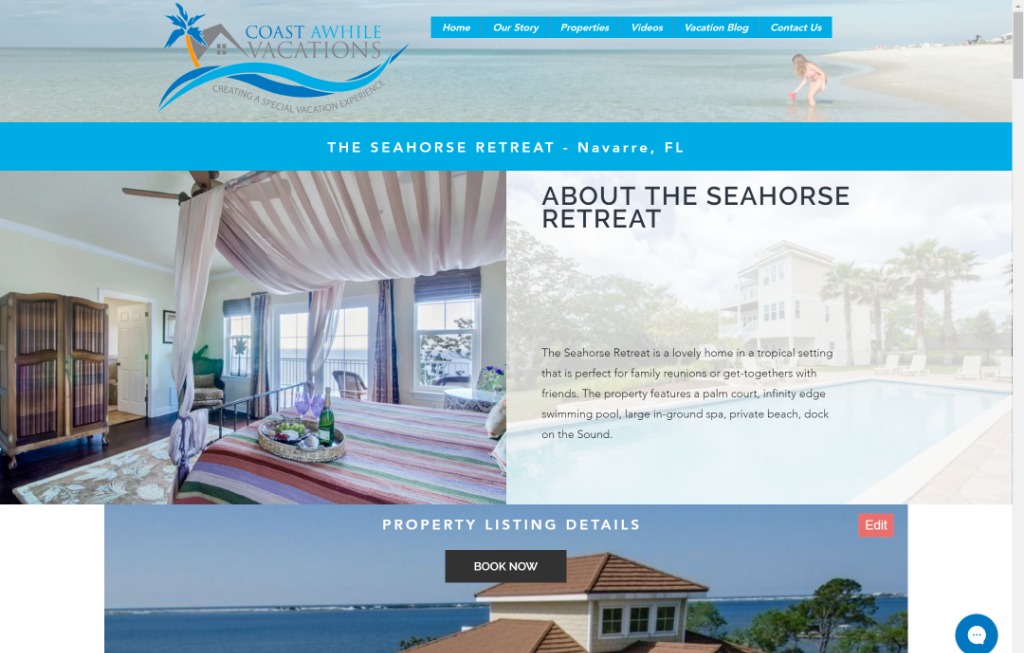
Enough Talk Already...What does it look like? You should see it in action, so I'm embedding a link to an example property listing. You should also take a look at it on a smartphone. There is room for refinement with the look on some devices, but these things are a continual work in progress.
Desktop View: Everything below "PROPERTY LISTING DETAILS" is the Houfy listing displaying content that can be edited within My Listings in Houfy. Everything above it is content driven part of my website such as the logo, navigation, and header graphics.
Mobile View: I've chosen to hide some page elements in order to show listing content sooner.
Update (August 2026): the address in this story no longer embeds a full listing.
https://www.houfy.com/embed/YOUR-LISTING-ID/listing now renders a single compact property card - one photo, the title, the city, the star rating, guests/bedrooms/bathrooms and a link through to your listing on Houfy. It is about 320 pixels wide and it is free on every plan. It is the same snippet you get from the share icon above your listing photos, under the Embed tab.
There is no longer any address that puts the whole Houfy listing page inside your own site, so the adjustments described below - hiding the Houfy header, covering the More places to stay line, covering the Houfy footer, dragging the frame until the scrollbar disappears - no longer apply to anything.
What to use instead: build the page out of Houfy widgets. Go to Manage Listings > Website widgets and embed the pieces you want - Price & booking, Availability calendar, Photo gallery, Guest reviews, Amenities, Policies, Seasonal pricing, Listing description, Listing summary, Sleeping configuration, Activities. Each one gives you an HTML block and a JavaScript snippet; paste both. Widgets are a Premium feature and they read live from your Houfy listing, so changing a photo or a rate on Houfy still updates your own site with no extra work.
The rest of this story - why embedding beats maintaining your own calendars, galleries and review pages, and the savings from dropping a separate PMS and payment gateway - still stands.
If you liked this "How To" story drop us a note in Comments below. And if you would like to view more "How To" stories we have written about marketing property with Houfy, please see the guide below:
Did this answer your question?
Related Articles
- Where to find your Houfy widget embed code
- How to add Houfy widgets to your own website
- How to share the widget code with someone?
- Embed Houfy widgets: calendar, pricing, reviews and guidebooks
- We embedded some of the Houfy widgets to our own Wordpress website and received a direct booking including payment!