
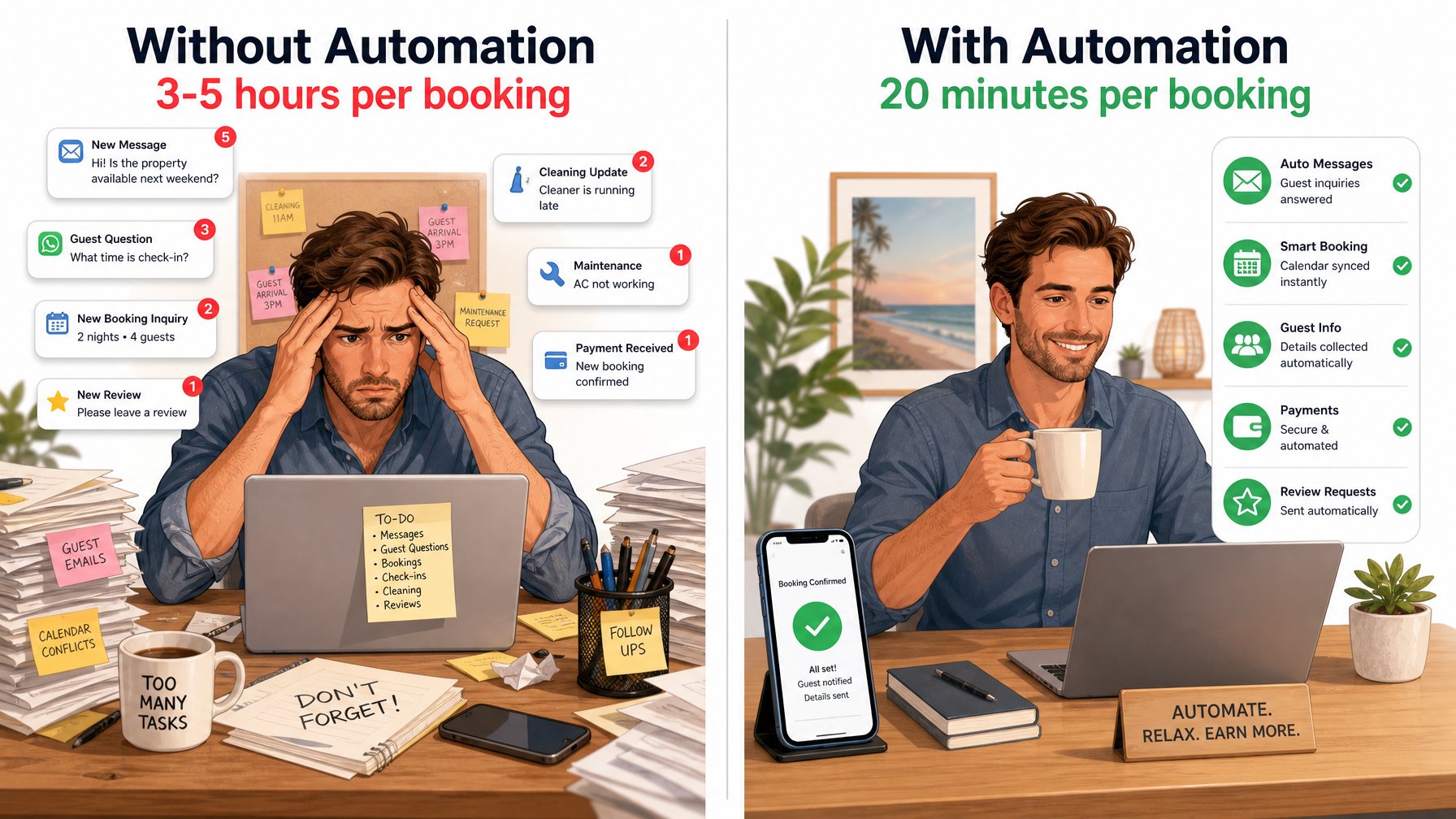
The average vacation rental host spends 3–5 hours per booking on guest communication — answering the same questions, sending the same check-in instructions, following up on the same review requests. Automated guest messaging for vacation rentals removes this repetition without removing the personal touch that earns 5-star reviews. This guide shows you how to build a complete automated messaging sequence that works directly with your Houfy listing, using tools your guests will never know are running.
Key Takeaways
Automated guest messaging handles the 80% of vacation rental communication that is repetitive and predictable, freeing you for the 20% that requires personal attention
Response time is the number one driver of positive review mentions about hosts — automation ensures no message goes unanswered for hours
The core automated sequence covers five touchpoints: booking confirmation, pre-arrival, check-in day, mid-stay check-in, and post-stay review request
Hospitable and Host Tools are the two most widely used automation tools with native Houfy integration — both have free tiers for independent hosts
Personalization variables such as guest name, check-in date, and property name make automated messages feel genuinely human
Never automate the problem-resolution message — genuine issues require a personal, empathetic response within minutes
Hosts who use automated messaging consistently report shorter guest response cycles, fewer complaints at checkout, and a measurable lift in 5-star review rates
Why Automated Messaging Is the Highest-ROI Operational Change You Can Make
Before building the sequence, it helps to understand where the time actually goes. A typical booking cycle generates seven to ten distinct host-to-guest touch points:
Initial inquiry or booking confirmation response
Pre-arrival logistics (check-in instructions, parking, access codes)
Day-of check-in confirmation
Mid-stay welfare check
Late-stay or checkout reminder
Post-stay thank-you
Review request
When managed manually, each of these requires the host to recall which guest is in which stage, draft a message from memory, personalize it, and send it — across every active booking simultaneously. For a host with five active bookings at different stages, this becomes unmanageable. For a host with fifteen, it becomes a part-time job.
Automation solves this by decoupling the communication from your attention. You write the messages once. The system sends them at the right moment for every booking, forever.
The Five-Message Automated Sequence Every Host Needs
This sequence covers the complete guest lifecycle from booking to review. Each message serves a distinct function — remove any one of them and you create a gap that either increases anxiety for the guest or reduces review conversion for the host.
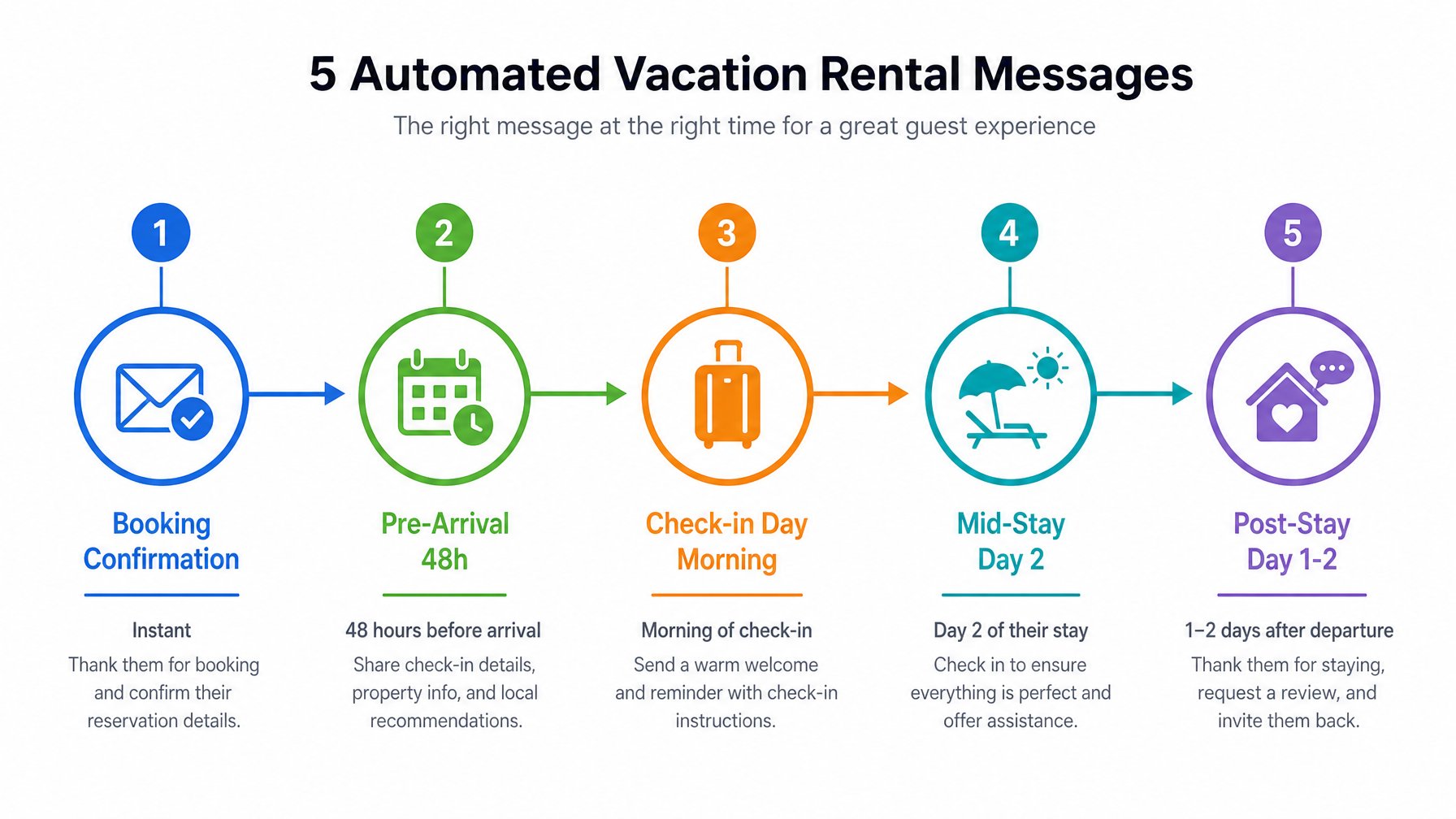
Message 1 — Booking Confirmation (Immediate)
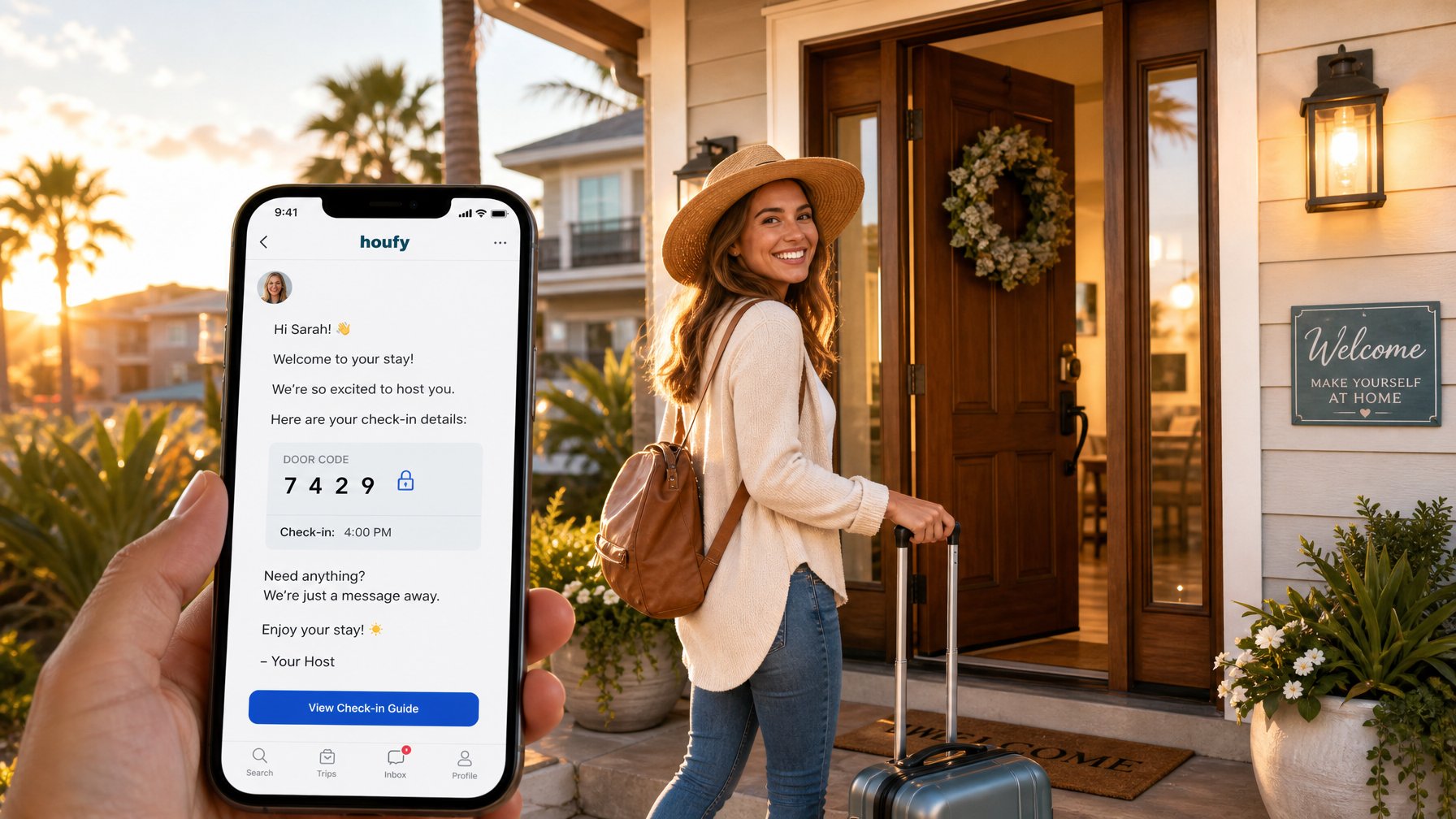
Triggered the moment a booking is confirmed. This message does three things: confirms the logistics, introduces you as a real human host, and sets the expectation for what the guest will receive next.
Template:
Hi [Guest Name], great news — your stay at [Property Name] from [Check-in Date] to [Checkout Date] is confirmed. I'm [Host Name], and I'll be your host throughout your visit. My direct number is [number] if you ever need to reach me. I'll send your full check-in details 48 hours before arrival — but feel free to reach out any time with questions before then. Looking forward to welcoming you.
Why it works: Guests who receive an immediate confirmation message from a named host (not a platform notification) report significantly higher pre-arrival confidence. For direct booking hosts on Houfy, this message also reinforces the value of booking direct — they heard from a real person, immediately.
Message 2 — Pre-Arrival (48 Hours Before Check-In)
The logistical workhorse of the sequence. This message should contain everything a guest needs to arrive without friction:
Full property address and any specific navigation notes (GPS sometimes sends guests to the wrong entrance)
Check-in time and access method (door code, lockbox, key collection)
Parking instructions
WiFi network and password
A link to your digital welcome book, if you use one
A reminder of your direct contact number
One or two local recommendations — a coffee shop, a grocery store — to show genuine hospitality
Keep this message warm but structured. Guests read it on mobile the day before they travel — clarity matters more than eloquence here.
Message 3 — Check-In Day (Morning of Arrival)
Short, welcoming, and reassuring. This message arrives when the guest is already in travel mode. Its only job is to confirm that everything is ready and that you are reachable.
Template:
Good morning [Guest Name] — today's the day! Your check-in window opens at [time], and everything is ready and waiting for you at [Property Name]. Safe travels, and text me if you run into anything at all on the way. Can't wait for you to see the place.
Message 4 — Mid-Stay Check-In (Day 2 of Stay)
This message is the most underrated in the sequence, and the most impactful for review outcomes. A proactive mid-stay check-in does something critical: it gives guests permission to raise issues before they decide that a negative review is the only way to be heard.
Template:
Hi [Guest Name], just checking in — hope the first night was comfortable! Is there anything I can help with or adjust to make your stay even better? I'm happy to suggest restaurant ideas, help with activities in the area, or sort out anything around the property. Just say the word.
Research from short-term rental operators consistently shows that guests who receive a mid-stay check-in report problems at a rate that allows hosts to resolve them — rather than discovering them in a review.
Message 5 — Post-Stay Review Request (1 Day After Checkout)
The review request is where most hosts either under-ask (a generic "please review us") or over-ask (multiple follow-ups that feel like pressure). The right approach is warm, specific, and sent exactly once.
Template:
Hi [Guest Name], thank you so much for staying at [Property Name] — it was a genuine pleasure to have you. If you have a moment to leave a review, it means more than I can say for an independent host. It's what helps the next guest decide, and it's what fills the calendar. Hope your trip home was smooth, and I'd love to have you back any time.
Ready to list your property on a platform built for direct bookings? Create your free Houfy listing and start building guest relationships that belong to you — not an algorithm.
Tool Options: Hospitable, Host Tools, and Houfy Direct
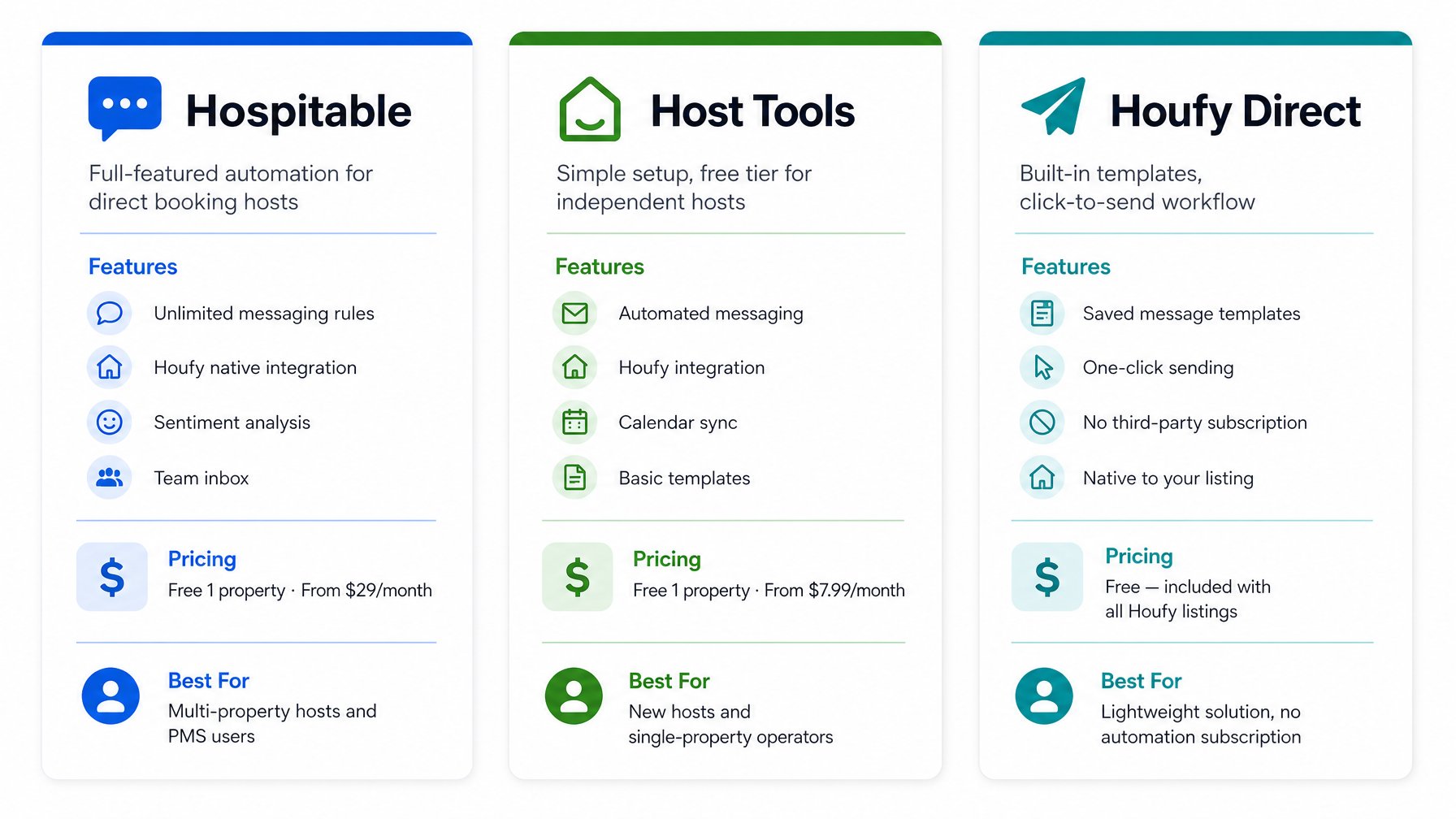
Three tools serve the vast majority of Houfy hosts for automated messaging. The right choice depends on your property count, budget, and how much customization you want.
Hospitable
Hospitable is the most feature-complete option for direct booking hosts. Native Houfy integration, unlimited messaging rules, sentiment analysis on incoming messages, and a shared team inbox make it the right choice for hosts managing multiple properties or anyone who wants to build sophisticated conditional logic into their sequences.
Free plan: 1 property, basic messaging automation
Paid plans: from $29/month
Setup time: approximately 60–90 minutes for the full five-message sequence
Standout feature: conditional triggers — send a different pre-arrival message for guests with a 7+ night stay vs. a weekend booking
Best for: hosts managing two or more properties, anyone using a PMS, and hosts who want granular control over message logic.
Host Tools
Host Tools prioritizes simplicity and speed. The interface is cleaner, setup is faster, and the free tier covers most independent host needs. Direct Houfy integration, calendar sync, and basic messaging automation are all available without a paid subscription.
Free plan: 1 property, core messaging and calendar sync
Paid plans: from $7.99/month
Setup time: approximately 30–45 minutes for the full sequence
Standout feature: the speed of initial setup — most hosts have their first automated message live within 20 minutes
Best for: new hosts, single-property operators, and anyone who wants the system running with minimal configuration time.
Houfy Direct (Built-In Templates)
Houfy's native messaging includes saved message templates and one-click sending. This is not fully automated — you still click send — but it removes the drafting step entirely. For hosts who want the efficiency of templates without a third-party subscription, this is a practical middle ground.
Best for: hosts comfortable with a click-to-send workflow, those who prefer to control exactly when each message goes out, and anyone not ready to commit to a paid tool.
All three options are listed on the Houfy Software Partners page, where you can review the full integration specifications for each tool before deciding.
What Automated Guest Messaging Should Never Handle
Knowing what to automate is only half the skill. Knowing what to keep personal is equally important.
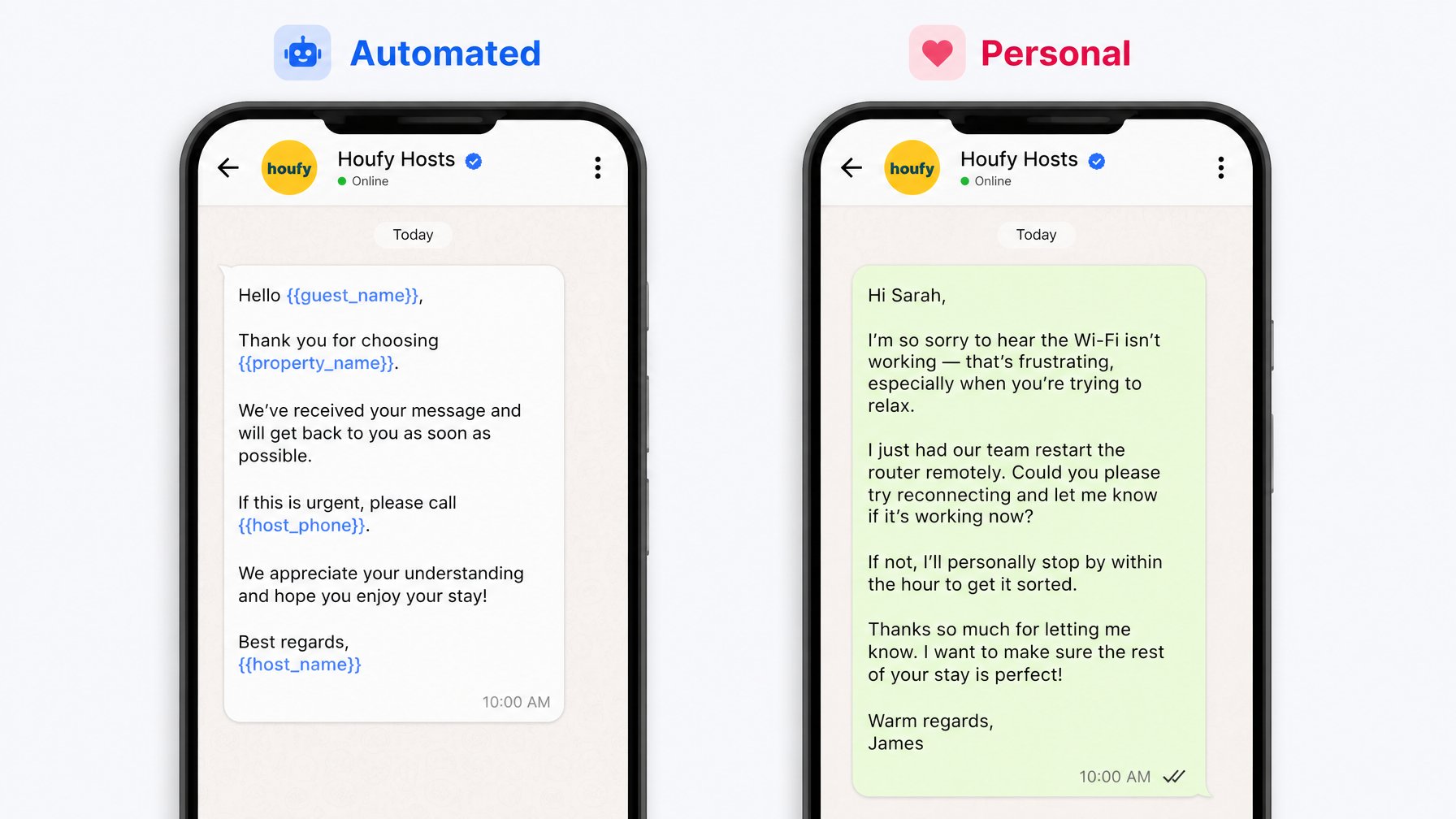
Guest complaints or property issues. If a guest reports that the hot water isn't working, the WiFi is down, or something was damaged on arrival, a template response is worse than no response. Stop the automation sequence for that booking and respond personally, within minutes, with a specific plan to resolve the issue.
Damage or dispute situations. Any booking that involves a claim or potential dispute should be handled entirely outside the automated sequence. Every message in these situations needs to be deliberate, factual, and personally considered.
Requests that require real judgment. A guest asking to check in eight hours early, bring an additional pet, or extend their stay by two nights needs a real answer that weighs availability, house rules, and what you actually want to offer. A canned template in response to a sincere personal request damages the guest relationship the rest of your automation has been building.
The rule of thumb: automate everything you would say identically to every guest in every booking. Personalize everything where knowing this specific guest's situation changes the answer.
How to Set Up the Sequence in Hospitable: Step by Step
The setup process below applies to Hospitable, but the logic maps directly to Host Tools and most other automation platforms.
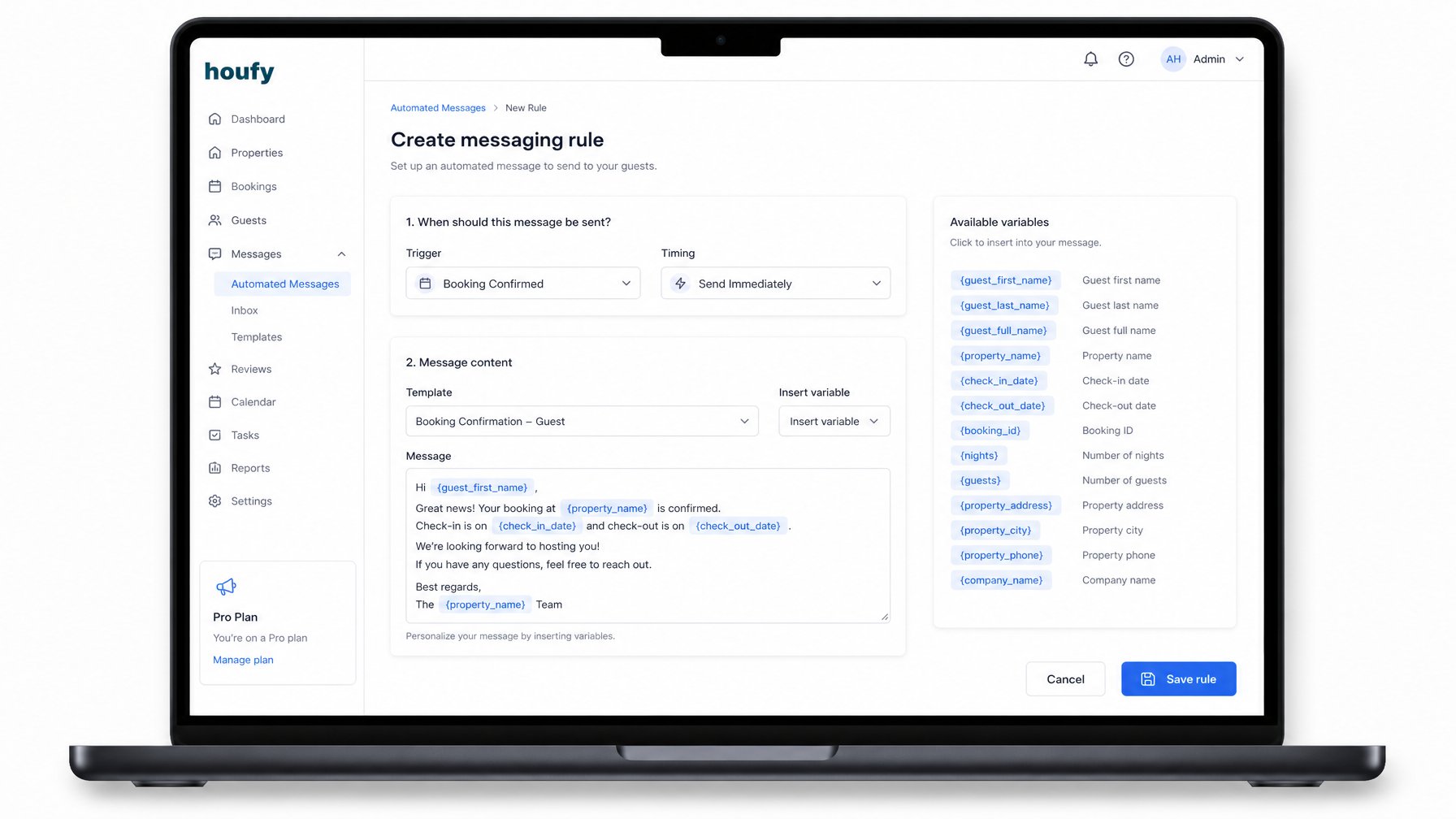
Step 1. Create a free account at hospitable.com.
Step 2. Connect your Houfy listing through the integration settings panel. Houfy is listed under direct booking channel integrations.
Step 3. Navigate to "Messaging" and select "Create Rule."
Step 4. For Message 1, set the trigger to "Booking confirmed" with zero delay (fire immediately). Write your confirmation message using the variable library: {{guest_first_name}}, {{check_in_date}}, {{checkout_date}}, {{listing_name}}.
Step 5. Repeat for each subsequent message, setting the timing trigger for each:
Message 2: 48 hours before check-in
Message 3: morning of check-in (set to 8:00 AM guest local time)
Message 4: 24 hours after check-in
Message 5: 24 hours after checkout
Step 6. Enable a test mode booking or use Hospitable's preview function to review each message exactly as the guest will receive it. Check that all variables resolve correctly.
Step 7. Activate all five rules and monitor the first real booking manually to confirm delivery.
Total first-time setup: approximately 60–90 minutes. Time reclaimed per booking going forward: 3–5 hours.
Automated Messaging and the Direct Booking Advantage
There is a strategic dimension to automated messaging that most guides overlook. When a guest books through an OTA, every communication runs through the platform's messaging system. The host does not own the conversation thread. The platform does. Guest contact information is hidden until after check-in and, on some platforms, permanently.
When a guest books directly through Houfy, you own the full conversation from the first message. You have the guest's real email address, their direct phone number if they share it, and a communication channel with no intermediary. Your automated sequence builds a relationship that is entirely yours.
This matters beyond the individual booking. A guest who has communicated directly with you through five thoughtful, well-timed messages is far more likely to return and book direct again — bypassing OTA fees entirely for both parties on future stays. The automation sequence is not just operational efficiency. It is the mechanism through which you convert a one-time OTA traveler into a direct repeat guest.
For more context on how the right tools compound this advantage, see our guide to the best apps for vacation rental property managers and our breakdown of AI tools that streamline short-term rental operations.
Already listing on Houfy? Visit the Software Partners page to connect Hospitable or Host Tools to your listing in minutes and activate your first automated message before your next booking confirms.
Frequently Asked Questions
Will guests know my messages are automated?
No — not if they are written with a natural tone and proper personalization variables. The mid-stay check-in and post-stay thank-you messages are the ones guests most frequently describe as "personal" and "thoughtful" in reviews, even when they are part of a fully automated sequence. The key is to write them as you would write to a real person, not as a form letter.
Can I pause automation for a specific booking?
Yes. Both Hospitable and Host Tools allow you to pause, skip, or override automated messages for any individual booking with one click. This is essential when a guest has reported an issue and the situation requires manual, personal handling. Make it a habit to check the automation status whenever a problem booking is flagged.
Does automated guest messaging work for Houfy bookings made through the mobile app?
Yes. Hospitable and Host Tools integrate with your Houfy property at the listing level, not at the channel or device level. Any booking that comes through Houfy — desktop, mobile app, or direct link — triggers the same automation sequence.
How many messages is too many?
Five messages across a typical three-to-seven-night stay is the right number for most guests. Research from short-term rental operators tracked by AirDNA and similar analytics platforms consistently shows that guests who receive more than eight host-initiated messages during a stay begin to perceive communication as intrusive. The five-message sequence is calibrated to stay well inside that threshold while covering every meaningful moment in the guest journey.
What personalization variables are most important to include?
At minimum, include {{guest_first_name}} in every message and {{listing_name}} in the confirmation and check-in day messages. Adding {{check_in_date}} and {{checkout_date}} to the confirmation message prevents confusion for guests who book multiple properties simultaneously. For the mid-stay message, avoid referencing specific dates — a warm, open-ended check-in reads more naturally than one that calculates the exact night count.
Can I use automated messaging if I self-manage without a PMS?
Yes. Host Tools specifically is designed for self-managing hosts with no PMS. Its free tier handles the full five-message sequence for a single property without requiring any additional software, subscription, or technical integration beyond connecting your Houfy listing.
Source Citations
Hospitable — Vacation Rental Messaging Automation — https://www.hospitable.com
Host Tools — Free STR Automation Platform — https://hosttools.com
AirDNA — Short-Term Rental Market Research and Analytics — https://www.airdna.co
Houfy Software Partners — Integration Directory — https://www.houfy.com/software-partners
Not on Houfy yet? List your property for free — keep 100% of your nightly rate, own your guest relationships, and let the right tools handle the communication so you can focus on the experience.
Houfy currently has 98,000+ verified listings across 50+ countries.
Last Updated: June 2026